

Geometric Dimensioning and Tolerancing (GD&T) is a symbolic language used on engineering drawings to control the shape, size, orientation, and location of features.
Understanding how to apply GD&T symbols in engineering drawings ensures proper fit, function, and interchangeability of parts throughout manufacturing and assembly.

A datum is a theoretical reference (plane, line, or point) used for measurement.
Common datum symbols:
A, B, C (primary, secondary, tertiary)
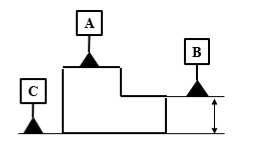 Application:

Form controls are used to control the shape of a feature, independent of its size, location, or orientation.
Unlike other GD&T controls, they do not require a datum reference.
These controls focus purely on the geometry of individual features.
In GD&T, form controls are classified into four types:
Straightness specifies that a line element of a feature, or the axis of a feature of size, must lie within a straight tolerance zone defined by two parallel lines (or a cylindrical zone for an axis).
The tolerance zone is:
Two parallel lines (for surface elements)
A cylinder (for an axis or centerline)
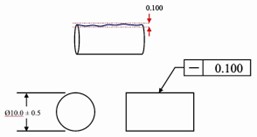
Two types of straightness:
Controls straightness of individual line elements on a surface.
Tolerance zone: two parallel lines.
Controls straightness of the derived axis of a shaft or hole.
Tolerance zone: a cylindrical
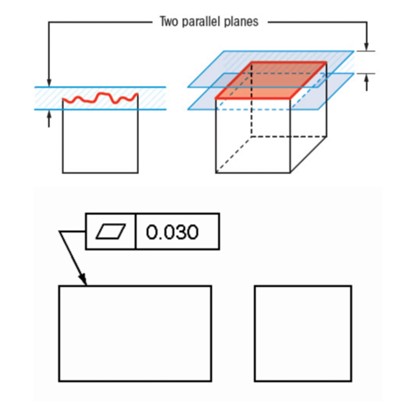
Flatness is a form tolerance that controls how much a surface can deviate from a perfectly flat plane.
The tolerance zone is two parallel planes.
For example, when a surface has a flatness tolerance of 0.05 mm, then the entire surface must, therefore, lie between two parallel planes spaced 0.05 mm apart.
Circularity specifies that each circular cross-section of a feature must lie within a tolerance zone defined by two concentric circles, separated by the tolerance value.
The tolerance applies to every circular element along the feature.
For example: If a shaft has a circularity tolerance of 0.01 mm, every circular cross-section of the shaft must fit between two concentric circles 0.01 mm apart.
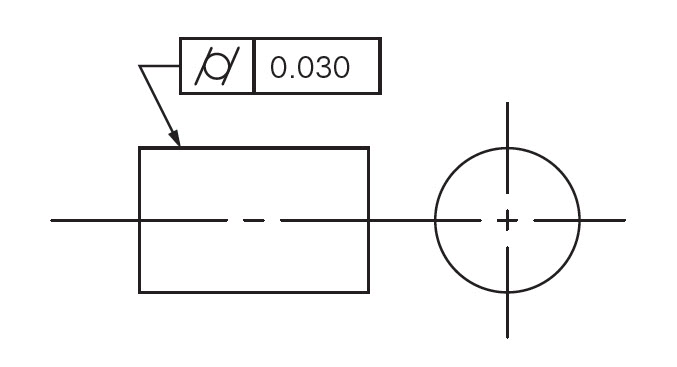
Cylindricity specifies that the entire surface of a cylinder must lie within a tolerance zone defined by two concentric cylinders, separated by the tolerance value.
The tolerance applies to the entire cylindrical surface, not individual cross-sections.
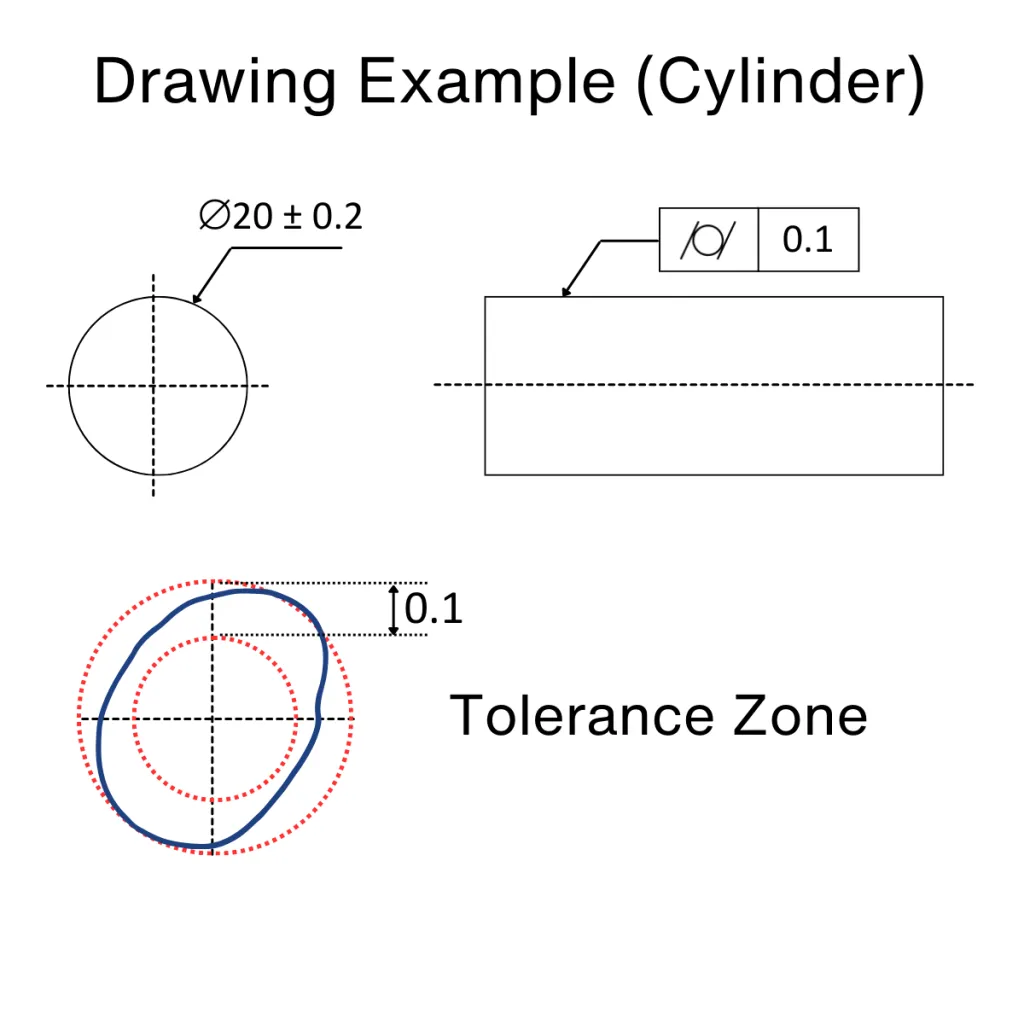
For example: If a shaft has a cylindricity tolerance of 0.02 mm, the whole cylindrical surface must fit between two concentric cylinders 0.02 mm apart.
Applications:
Orientation controls define the angular relationship—such as tilt or direction—of a feature relative to a datum reference.
t=”258″ data-end=”261″ />>Orientation controls align features correctly to support proper function and assembly.
Designers must always specify a datum reference when applying orientation controls.
In GD&T, orientation controls are classified into three types:
Angularity specifies that a surface, axis, or center plane must be oriented at a specified angle (other than 0° or 90°) relative to a datum reference, within a defined tolerance zone.
Surface angularity: Two parallel planes at the specified angle.
Axis angularity: A cylindrical tolerance zone at the specified angle.
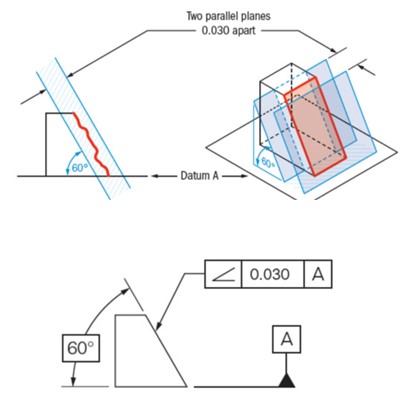
For example: If a surface has an angularity tolerance of 0.05 mm at 30° relative to datum A, the surface must lie between two parallel planes 0.05 mm apart, oriented 30° to datum A.
Perpendicularity specifies that a surface, axis, or center plane must be oriented at 90° to a datum reference, within a specified tolerance zone.
Surface perpendicularity: Two parallel planes perpendicular to the datum.
Axis perpendicularity: A cylindrical tolerance zone perpendicular to the datum.

For example: If a hole has a perpendicularity tolerance of 0.02 mm relative to datum A, the axis of the hole must lie within a 0.02 mm diameter cylindrical zone that is perpendicular to datum A.
Parallelism specifies that a surface, axis, or center plane must be oriented parallel to a datum reference, within a specified tolerance zone.
Surface parallelism: Two parallel planes parallel to the datum.
Axis parallelism: A cylindrical tolerance zone parallel to the datum.
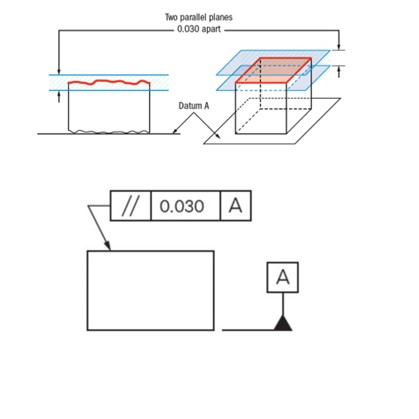
For example: If a surface has a parallelism tolerance of 0.03 mm relative to datum A, the surface must lie between two parallel planes 0.03 mm apart, oriented parallel to datum A.
Applications:
Location controls used to control the exact position of a feature relative to one or more datum references.
Position defines the allowable variation for the axis, center point, or center plane of a feature of size.
The tolerance zone is located and oriented using datum references relative to the feature’s true position.
This control ensures accurate placement of features for proper assembly and function.
In GD&T, position is classified as a location control.
Can be applied with MMC, LMC, or RFS material conditions.

For example: If a hole has a position tolerance of ⌀0.10 mm relative to datums A, B, and C, the axis of the hole must lie within a 0.10 mm diameter cylindrical tolerance zone located from the true position defined by those datums.
Applications:
Profile controls define the allowable variation of a line or a surface from its true geometric profile.
Depending on the design requirement, datum references may or may not be used.
These controls are commonly applied to complex shapes where form and location must be controlled together.
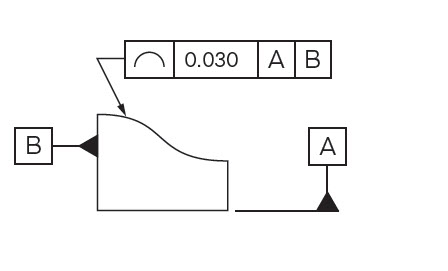
This control requires all points on a surface to lie within a tolerance zone.
The zone is bounded by two offset surfaces that are equally disposed about the true profile.
The true profile itself is defined directly by the drawing.
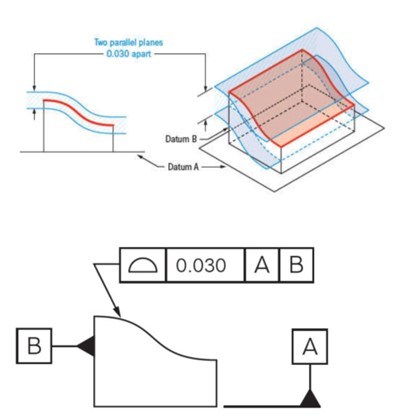
For example:-If a curved surface has a profile of surface tolerance of 0.5 mm relative to datums A and B, the entire actual surface must lie within ±0.25 mm of the true profile, oriented and located from those datums.
Profile of a line specifies that each line element of a surface, taken in a specified direction, must lie within a tolerance zone bounded by two parallel lines, equally disposed about the true profile.
For example:
When a designer applies a 0.2 mm profile of a line tolerance to a cam profile, each specified cross-section of the cam must lie within ±0.1 mm of the true profile.
Applications:
Runout controls define the allowable variation of a surface when rotated about a specified datum axis.
Circular runout requires each circular cross-section of a rotating feature to remain within the specified tolerance zone as the part rotates 360° about the datum axis.
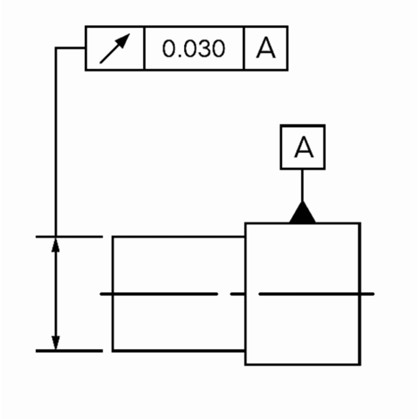
For example: If a shaft has a circular runout tolerance of 0.03 mm relative to datum A, then at any given cross-section, the total indicator reading (TIR) must not exceed 0.03 mm during one full rotation.
Total runout specifies that the entire surface of a rotating feature must remain within a tolerance zone as the part rotates 360° about the datum axis.
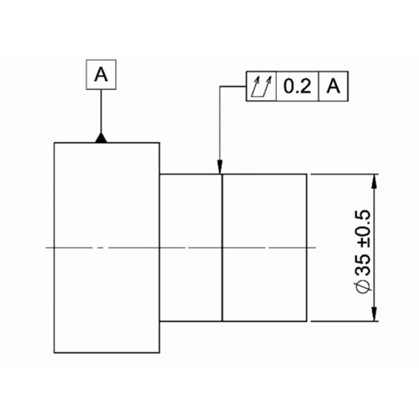
For example, if a shaft has a total runout tolerance of 0.04 mm relative to datum A, then the maximum indicator variation over the entire length and throughout a full rotation must not exceed 0.04 mm.
Applications:
Key Takeaways
When engineers apply GD&T thoughtfully, it helps everyone from design to manufacturing and inspection, understand the design in the same way. Knowing how to apply GD&T symbols in engineering drawings reduces confusion, avoids unnecessary rework, and supports smoother collaboration across teams. In the end, GD&T is not just about symbols on a drawing; it’s about making sure the part works as intended in the real world.



[…] MBD brings GD&T, communication, and manufacturing workflows together in a single cloud-native environment. […]