Have you ever spent hours hunting down a broken material link in a massive automotive scene? Or maybe you have struggled to get realistic, multi-bounce indirect lighting to run smoothly in a real-time review session. If you are nodding your head, you know that high-end visualization is as much about managing data chaos as it is about pushing pixels.
Autodesk has rolled out Autodesk VRED 2027.1, and it is a major milestone for automotive visualization specialists and CGI artists alike. Rather than just adding a few minor tweaks, this mid-cycle release delivers a complete ground-up rewrite of variant management alongside massive upgrades to the Vulkan rendering pipeline. Let’s dive into what makes this update a game-changer for your daily design reviews.
If your automotive or industrial design projects have outgrown the old variant management system, Variant Sets 2.0 is the headline feature you have been waiting for.
Autodesk has completely rebuilt the Variant Sets module from scratch. The result is a modern, hierarchical user interface that mirrors the clean layout of the VRED Material Editor.
Instead of dealing with a flat, endless list of configurations, you can now organize your variant sets into nested groups and favorite folders. This structure makes managing thousands of design permutations—like interior trim options, paint colors, and wheel packages—incredibly intuitive.
Even better, you can now drive your variant sets using metadata and search queries rather than relying strictly on exact object names. This means your automated scripts and configuration pipelines will not break when a CAD engineer renames a geometry node upstream.
We have all experienced the frustration of a broken link ruining a live presentation. Variant Sets 2.0 introduces real-time validation in the Attribute View, instantly flagging empty or broken links so you can clean them up before the client arrives. Additionally, according to the official Autodesk Alias & VRED Blog, you can now use tag-based exclusions to skip specific scene objects, materials, or cameras when switching variants, giving you surgical control over what changes during a review.

Real-time rendering continues to edge closer to offline CPU quality. With Autodesk VRED 2027.1, the Vulkan pipeline receives some of its most significant lighting upgrades to date.
Previously, achieving realistic indirect lighting in real-time rasterization required heavy baking or simplified approximations. VRED 2027.1 introduces multi-bounce Raytraced Diffuse Global Illumination (GI) directly into the Vulkan pipeline. This means light bounces naturally off surfaces, bringing realistic color bleeding and soft ambient lighting to complex automotive interiors and architectural spaces without requiring a full offline render.
On the hardware optimization front, GPU raytracing now leverages Shader Execution Reordering (SER). When rendering complex scenes with highly divergent material types—like metallic car paint right next to carbon fiber and clear glass—raytracing workloads can become highly inefficient. SER dynamically reorganizes these divergent ray workloads at runtime. This leads to significantly faster convergence times, meaning your viewport cleans up much quicker during interactive design sessions.
A rendering engine is only as good as its materials. This update brings physical realism to micro-surface details while simultaneously expanding stylized visualization options.
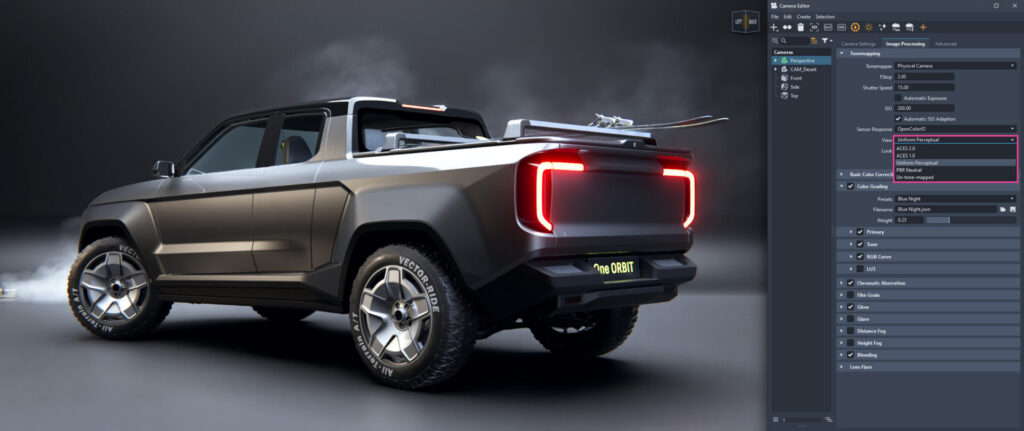
Thin Film interference simulates the beautiful, iridescent color shifts seen on oil slicks, soap bubbles, and coated glass. VRED 2027.1 brings Thin Film support to key material types, including Plastic, Metallic Car Paint, Chrome, Brushed Metal, and Glass. Because this is implemented across Vulkan, GPU, and CPU raytracing, you will get consistent, angle-dependent light interference regardless of your active render engine.
While photorealism is VRED’s bread and butter, there are times when you need stylized visuals for technical manuals, patent drawings, or early-stage design concepts. The expanded MaterialX and MDL support in VRED 2027.1 introduces non-photorealistic rendering (NPR) and toon shading. By utilizing nodes like viewdirection, facingratio, and gooch_shade, you can build custom shading networks that respond dynamically to lighting and viewing angles.
Heavy CAD datasets can easily bog down your rendering performance. To address this, Faceter V2 is now the default engine for file imports and geometry editing in VRED 2027.1.
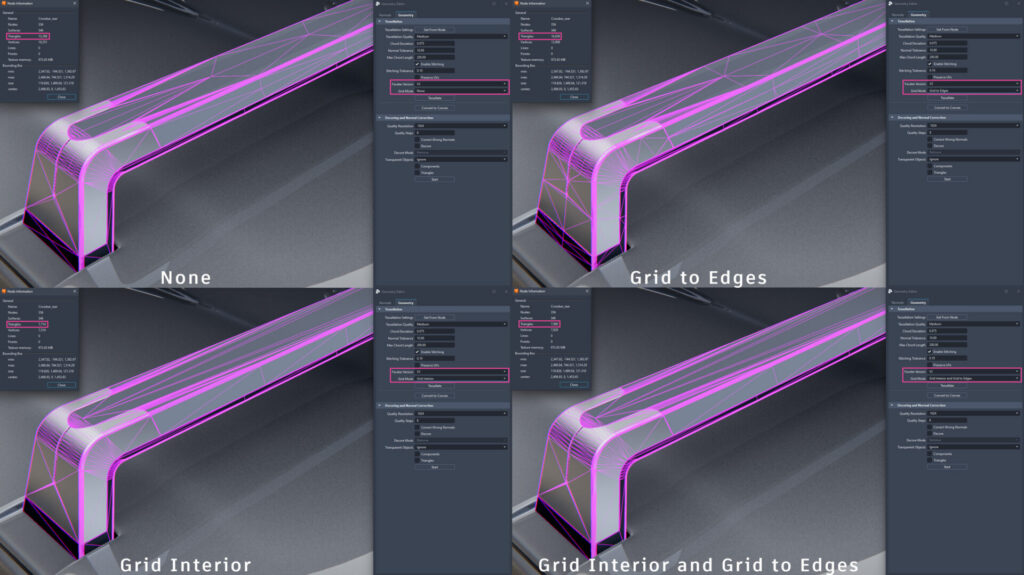
The updated tessellation algorithm features a new Grid Mode option. This mode creates highly homogeneous, grid-based triangle subdivisions. The benefits are twofold: your UV unwrapping becomes much cleaner, and you often end up with a significantly lower overall triangle count without sacrificing the smooth, curved surfaces essential for automotive styling.
Virtual and mixed reality reviews are no longer a novelty—they are a core part of the modern design sign-off process. VRED 2027.1 refines the XR workspace to make collaborative sessions much smoother.
Let’s look at how these new features stack up against older VRED workflows:
| Feature Area | Legacy VRED Workflows | VRED 2027.1 Workflow |
| Variant Management | Flat lists, easily broken by CAD renames, manual Python scripting required for complex logic. | Variant Sets 2.0 with hierarchical nesting, metadata-driven search, and real-time link validation. |
| Real-Time Lighting | Single-bounce or baked GI in rasterization; limited reflection details. | Multi-bounce Raytraced Diffuse GI and ray-traced ambient occlusion in Vulkan reflections. |
| GPU Performance | Standard raytracing paths; divergent shaders slow down viewport convergence. | Shader Execution Reordering (SER) optimizes workloads for faster convergence. |
| Tessellation | Standard faceting; occasionally irregular triangles and high polygon counts. | Faceter V2 as default with Grid Mode for cleaner, lower-poly subdivisions. |
Autodesk VRED 2027.1 proves that a point release can bring massive value to a production pipeline. By focusing on data management with Variant Sets 2.0 and squeezing more performance out of modern GPUs with Vulkan and SER, Autodesk is helping design teams make faster, more confident decisions.
Are you ready to take these new rendering features for a spin? If you want to test these workflows yourself, the VRED Learning Edition offers free access to VRED Professional for non-commercial use.
How will Variant Sets 2.0 change the way you manage your design configurations? Let us know your thoughts in the comments below!
This guide is based on insights from the official Autodesk Blog