If you have spent any time around high-density server deployments recently, you already know the thermal landscape has shifted dramatically. With artificial intelligence clusters pushing rack densities far beyond 30 kW—and next-generation accelerator architectures aiming for several hundred kilowatts per rack—keeping hardware cool is no longer just an operational detail. It is a core engineering challenge. Industry data shows that air cooling encounters severe thermal bottlenecks at these extreme power levels, compelling engineers to evaluate airflow and heat dissipation long before breaking ground Vaisala Thermal Analysis.
Building a multi-megawatt facility based on back-of-the-envelope heat balance calculations is a recipe for expensive surprises. Simple equations tell you if total heat generation equals total cooling capacity, but they completely miss localized airflow recirculation, flow starvation, and critical hot spots. Once the concrete is poured and racks are energized, fixing a dead air zone or a choked chiller intake can cost millions in retrofits and operational downtime.
Pre-construction thermal simulation solves this problem by giving mechanical facility engineers, CAD designers, and simulation specialists complete physical insight upfront. By leveraging the Siemens Simcenter portfolio—specifically 3D Computational Fluid Dynamics (CFD) in Simcenter STAR-CCM+—you can build a true digital twin of your data hall, mechanical plant, and external environment before a single server is installed. Original insight and workflows shared by Siemens partner Applied CAx highlight how multi-scale simulation changes the paradigm from reactive troubleshooting to front-loaded design confidence Siemens Simcenter Blog.
When you design a modern data hall floor, airflow distribution is inherently complex. Raised floor tiles, cable trays, overhead containment structures, and non-uniform server rack density create intricate air paths that simple 2D or 1D models cannot capture.
By simulating full 3D airflow with Simcenter STAR-CCM+, you map exact temperature gradients and air velocities across every row and rack inlet. This level of detail allows you to:
Catching these airflow imbalances during the 3D CAD phase lets you adjust tile perforations, reposition CRAC units, or alter row spacing with a quick drag-and-drop in your design environment rather than a costly field retrofit.
How does your cooling layout perform when a primary CRAC unit trips during peak operational load? Testing this on physical infrastructure means running actual servers at thermal limits while intentionally cutting off cooling—a scenario no facility owner wants to trigger during commissioning.
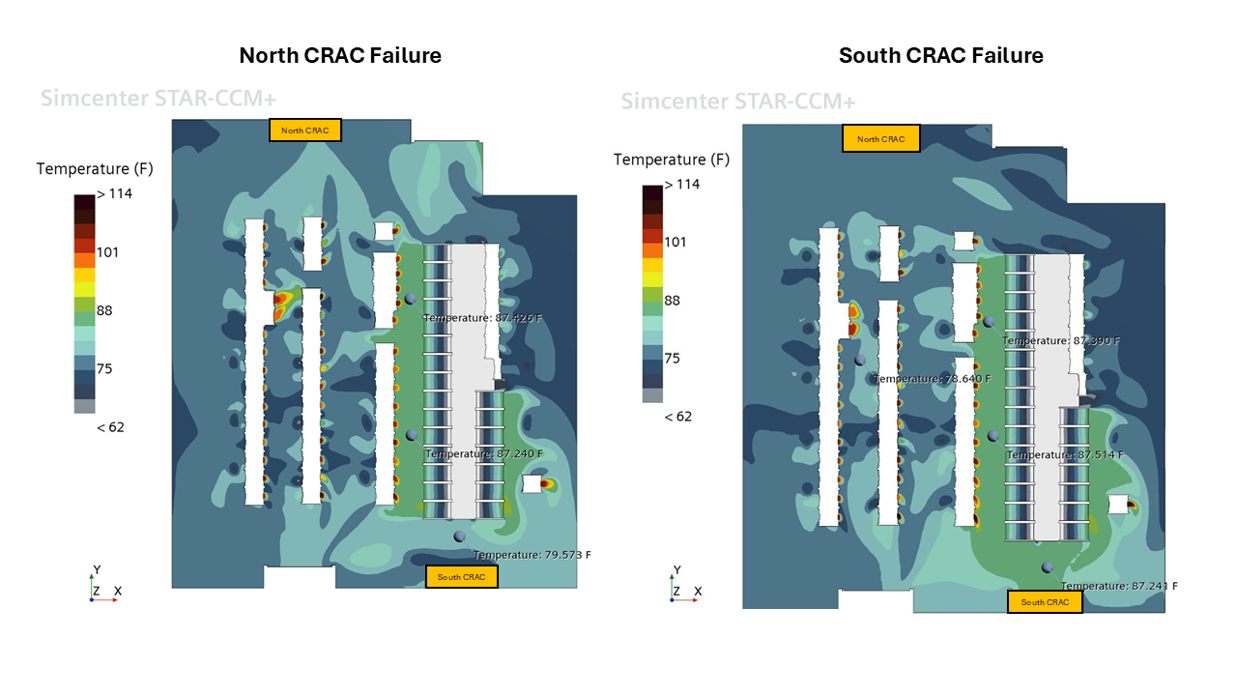
With 3D CFD, you can simulate partial or total failure conditions in seconds. By turning off specific CRAC units in your Simcenter STAR-CCM+ domain, you observe how neighboring units redistribute airflow, how quickly hot spots form, and how much margin you have before server inlet temperatures hit emergency thermal throttling thresholds. This data gives design teams exact specifications for mechanical redundancy and emergency control sequences.
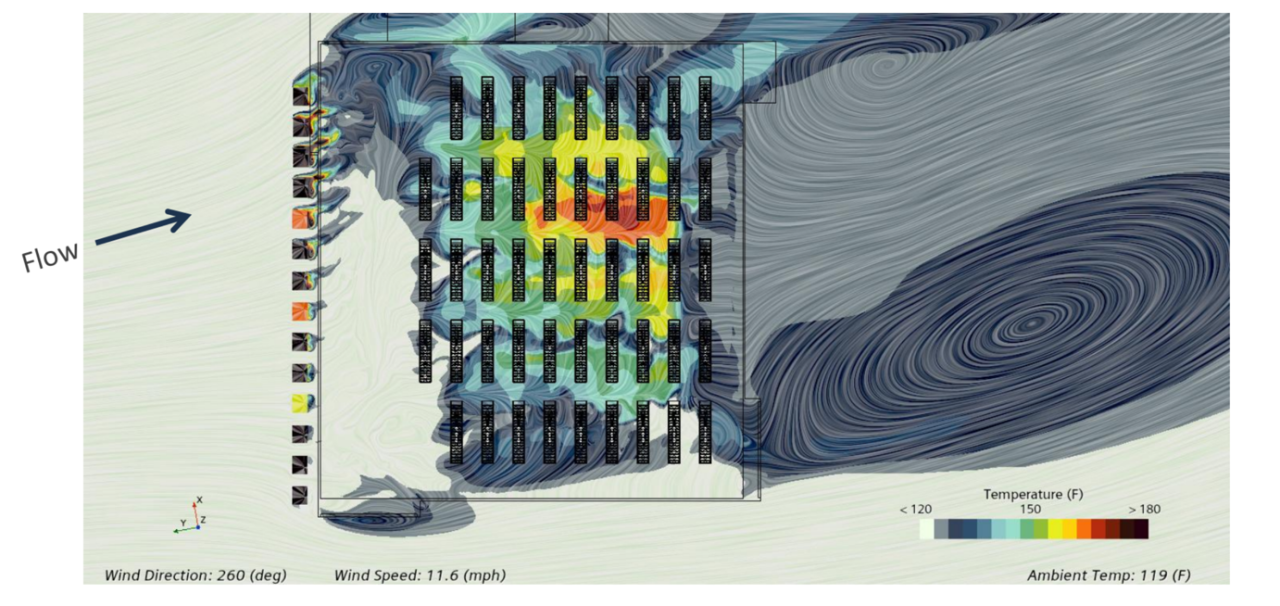
Cooling challenges do not stop at the building envelope. Rooftop air-cooled chillers and heat exchangers are heavily influenced by building geometry, prevailing wind directions, and exhaust plume interactions. If ambient wind pushes hot exhaust air directly into an adjacent chiller intake, chiller efficiency drops, risk of thermal tripping increases, and total plant efficiency degrades.
By coupling facility CAD geometry with real site meteorological data in Simcenter STAR-CCM+, engineers can simulate worst-case weather scenarios—such as high ambient temperatures paired with unfavorable wind speeds and directions. You can visualize thermal plumes around rooftop equipment, optimize chiller spacing, and position emergency diesel generator exhausts so hot gases never contaminate cooling tower air intakes.
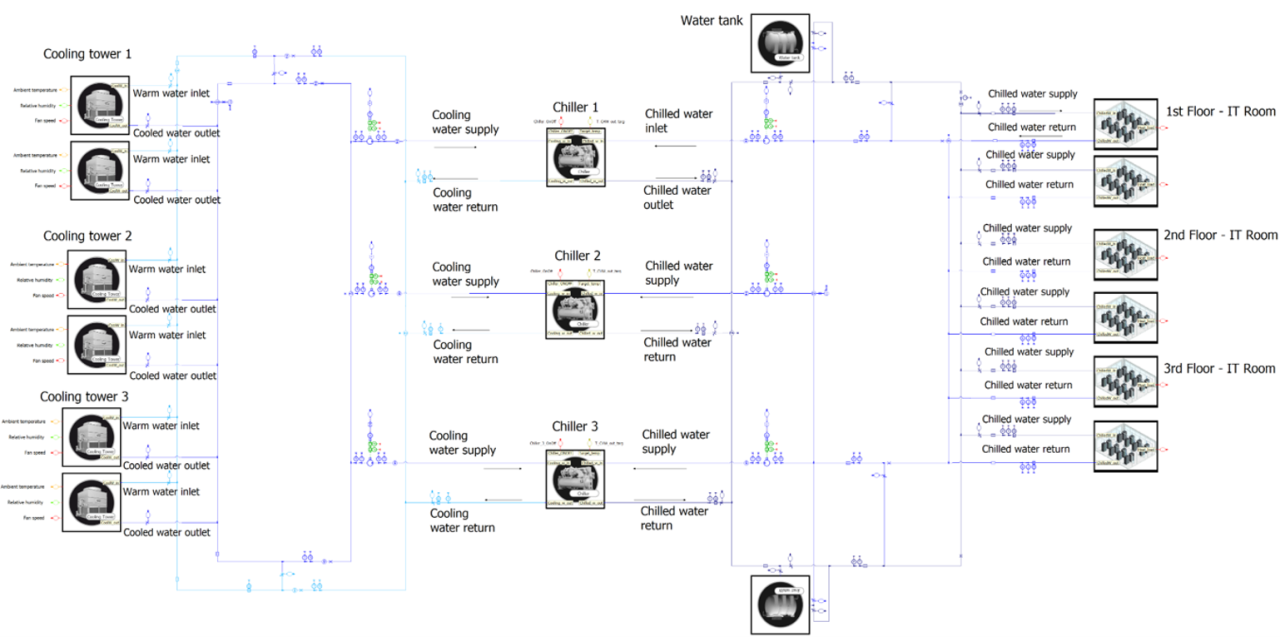
Data center thermal design spans multiple orders of magnitude. You need micro-scale analysis inside the server chassis, system-level transient modeling across piping networks, and full 3D room-scale CFD for the data hall. Using the right tool for each scale keeps computational solve times fast while maintaining design accuracy across the entire facility cycle.
Recent industry research emphasizes that direct-to-chip liquid cooling and hybrid architectures require tightly integrated, multi-scale simulation workflows to balance rack-level thermal flux with plant-level fluid dynamics Data Center Dynamics Analysis.
| Simulation Tool | Primary Modeling Scale | Key Applications & Workflows | Design Insight Delivered |
| Simcenter Flotherm | Chip, Board, & Server Level | Detailed board layouts, heat sinks, SmartParts, and electronic enclosures | Prevents component overheating; creates reduced-order thermal models (ROMs) |
| Simcenter Flomaster | 1D Thermo-Fluid Systems | Hydronic piping networks, pumps, valves, and chilled-water distribution loops | Sizes pipe networks, calculates head losses, and analyzes pressure surges/water hammer |
| Simcenter Amesim | 1D Multi-Domain System Controls | Integrated facility controls, chillers, thermal storage, and dynamic operational cycles | Evaluates dynamic energy consumption, control logic, and seasonal power usage (PUE) |
| Simcenter STAR-CCM+ | 3D Facility & External Environment | Full data halls, CRAC layouts, rooftop chillers, and conjugate heat transfer (CHT) | Maps 3D room airflow, eliminates hot spots, and predicts external weather impacts |
You don’t need a heavy 3D mesh for every piping run or valve in your plant. 1D network solvers like Simcenter Flomaster solve fluid transport and pressure drop across complex loops in seconds. When you connect 1D system networks with thermal reduced-order models (ROMs) generated in Simcenter Flotherm, you link true chip temperatures directly to your mechanical cooling loop hydraulics.
For facility-wide energy management, Simcenter Amesim ties together electrical grids, dynamic chillers, and smart control algorithms. This multi-scale link lets you evaluate variable-speed pump responses, economizer changeovers, and thermal energy storage performance across entire seasonal weather cycles without spending days waiting for massive CFD runs.
As AI accelerator chips consume more power, traditional air cooling is reaching its physical limits. This is driving wider adoption of advanced cooling technologies. These include direct-to-chip (D2C) liquid cold plates, rear-door heat exchangers, and immersion cooling systems.
Liquid cooling can transfer significantly more heat per unit volume than air. This makes it a key technology for managing thermal loads in high-density AI data centers.
However, liquid cooling introduces its own mechanical design challenges:
The beauty of a unified simulation strategy is that your modeling foundation remains intact. Simcenter STAR-CCM+ handles multi-phase fluid mechanics and complex CHT solid-fluid interfaces seamlessly. Meanwhile, Simcenter Flotherm analyzes cold-plate channels at the electronics level. Simcenter Amesim models CDU pumping efficiency and secondary cooling loops. This integrated digital twin approach supports different cooling architectures, including air cooling, direct-to-chip liquid cooling, and hybrid systems.
Thermal management is no longer an afterthought tucked into the final stages of data center commissioning. It is an active design discipline that determines whether a facility can scale, maintain uptime, and operate efficiently over its multi-decade lifecycle.
By combining Simcenter STAR-CCM+, Simcenter Flotherm, and 1D system simulation tools, engineers can make better design decisions early in the process. This approach helps identify thermal risks, test equipment failure scenarios, and improve energy efficiency. It also provides the insights needed to design data centers that can handle the increasing power demands of next-generation computing.
How is your team addressing high-density thermal management in your current project pipeline? Are you exploring hybrid liquid-cooling conversions or sticking with optimized air containment?Share your thoughts in the comments below, and follow ChampionXperience for more in-depth engineering insights, tutorials, and CAE workflows!