

What happens when water pushes against a flexible dam? The dam starts to bend, and as an opening forms, water begins to flow through it. This movement of water also affects how the dam deforms.
To study this type of interaction, engineers can use Coupled Eulerian-Lagrangian (CEL) analysis in SIMULIA on the 3DEXPERIENCE platform.
 In this Blog, we will first look at how CEL works and how it differs from other simulation methods. Then, we will use it to simulate an elastic dam that bends under water pressure.
You will learn how to define the materials, set up the fluid and structural domains, define contact between water and the dam, run the simulation, and review the results.
In some simulations, parts can deform so much that their mesh becomes distorted. This can make the results less accurate or cause problems during the calculation. CEL helps engineers handle these situations by combining two different approaches: Eulerian and Lagrangian.
Let’s look at how they work.
In a Lagrangian analysis, the mesh moves with the material. This method is commonly used for solid parts because it allows engineers to follow their deformation.
However, when a part undergoes very large deformation, its mesh can become badly distorted.
In an Eulerian analysis, the mesh stays in place while the material moves through it. This makes it useful for simulating fluids and materials that move or deform significantly.
For example, it can be used to study water flowing through an opening or material moving during a high-speed impact.
ALE combines aspects of both approaches. The mesh can move independently of the material, helping maintain good mesh quality as the simulation progresses.
ALE can be a good choice when the deformation is manageable. However, some problems involve too much material movement for this approach to work effectively.
A rod impact simulation is a useful example.
Each method has its advantages. The right choice depends on how much the material deforms and how it moves during the simulation.
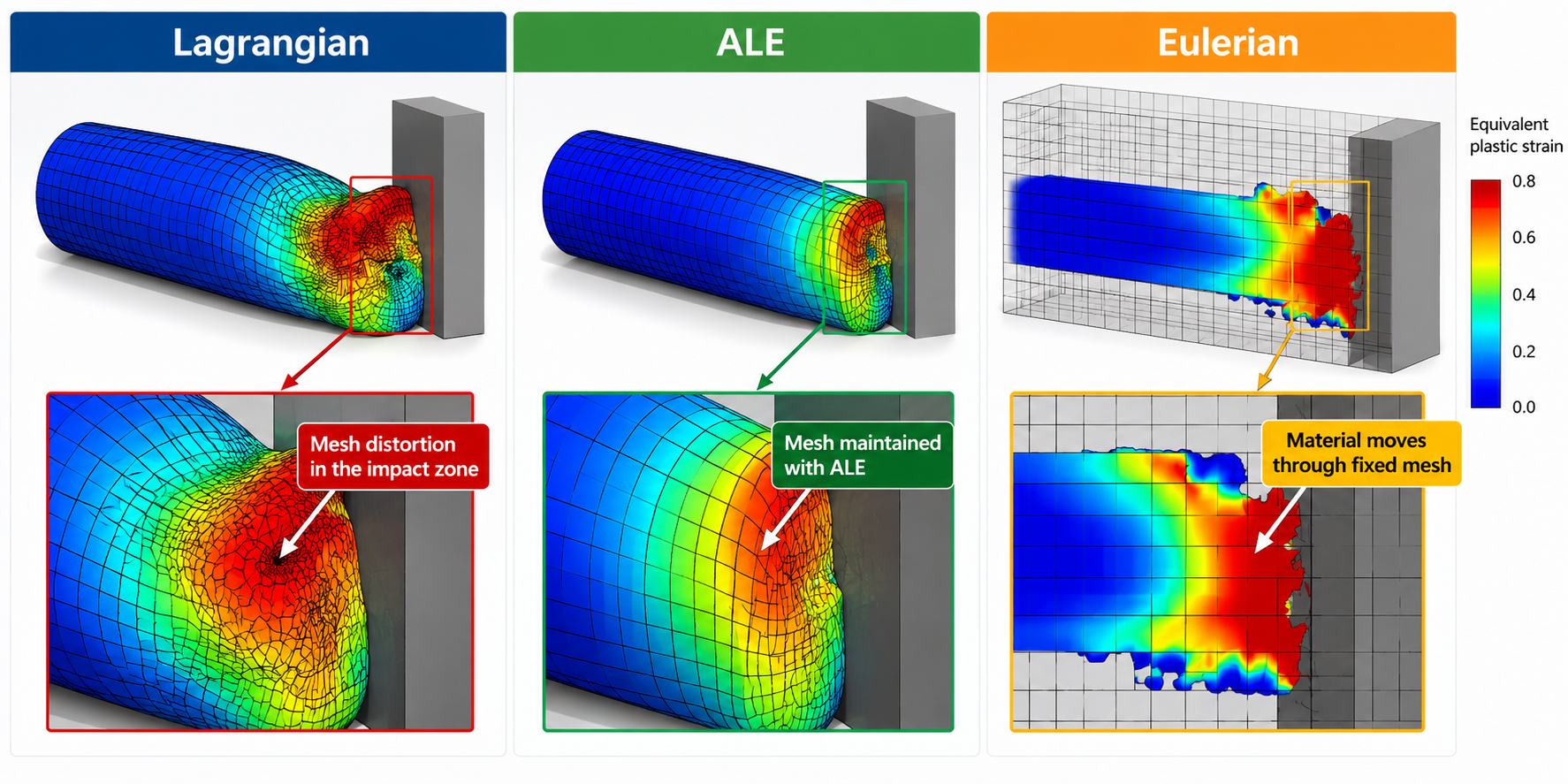 Figure 1. Comparison of Lagrangian, ALE, and Eulerian Mesh Formulations in Rod Impact Analysis
A washing machine is a good example of how CEL can be used to simulate fluid-structure interaction.
During the wash cycle, water moves around the drum and interacts with the rotating components. In a CEL simulation, the water is represented using an Eulerian mesh, allowing it to move through the fixed mesh, while the solid components, such as the drum, are represented using a Lagrangian mesh that follows their movement and deformation.
Contact between the water and the solid components allows the simulation to capture their interaction.
This example shows how CEL can help engineers study the movement of fluids and their interaction with moving structures.
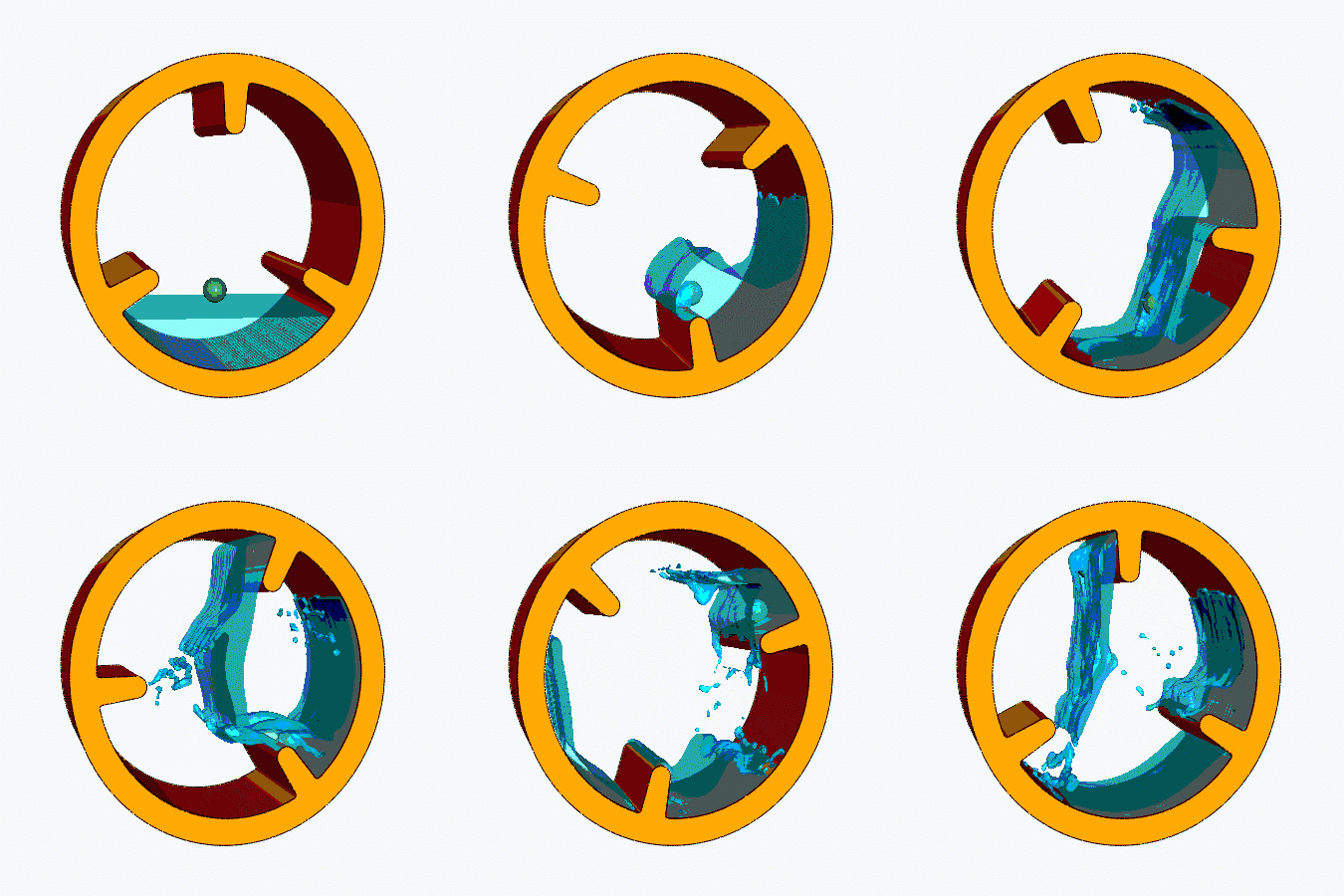 Figure 2. CEL Simulation Example: Water Flow in a Washing Machine
CEL combines Eulerian and Lagrangian approaches in the same simulation.
In our elastic dam example:
Dam (Lagrangian): The mesh follows the dam as it bends and deforms.
Water (Eulerian): The water moves through a fixed mesh.
Contact interaction: Allows the water and the dam to interact during the simulation.
CEL is useful for applications involving fluid flow, large deformations, and interactions between fluids and solid structures.
Now, let’s apply this approach to simulate the deformation of an elastic dam in SIMULIA 3DEXPERIENCE.
The goal of this simulation is to study how water pressure affects the dam and how the dam’s deformation changes the water flow.
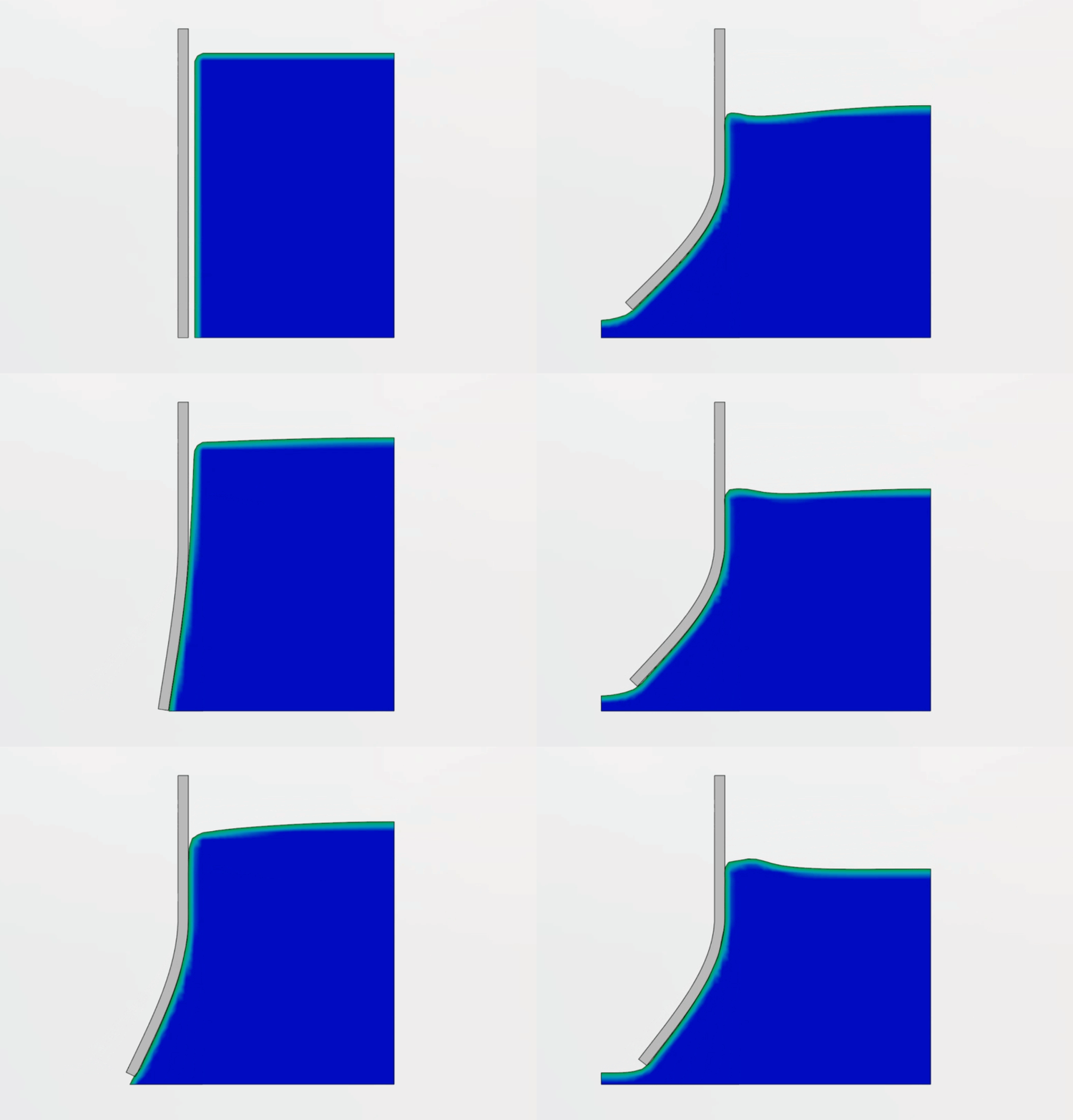 Figure 3. Simulation of the Elastic Dam
The model contains three parts:
The dam is fixed at its upper end and free at the other end. At the beginning, water is held behind the dam.
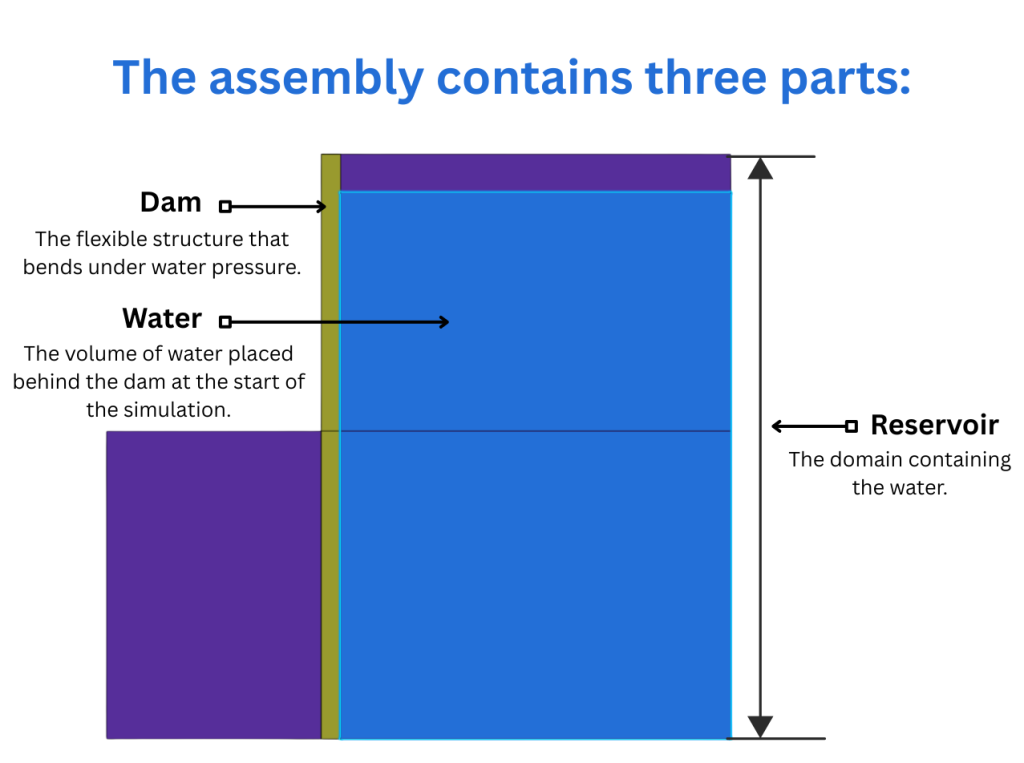 Figure 4. Three Parts of the Elastic Dam Assembly
As the simulation starts, water pressure causes the dam to bend. An opening develops, allowing water to flow through. The moving water then interacts with the dam as it continues to deform.
The simulation runs for a total of 0.2 seconds.
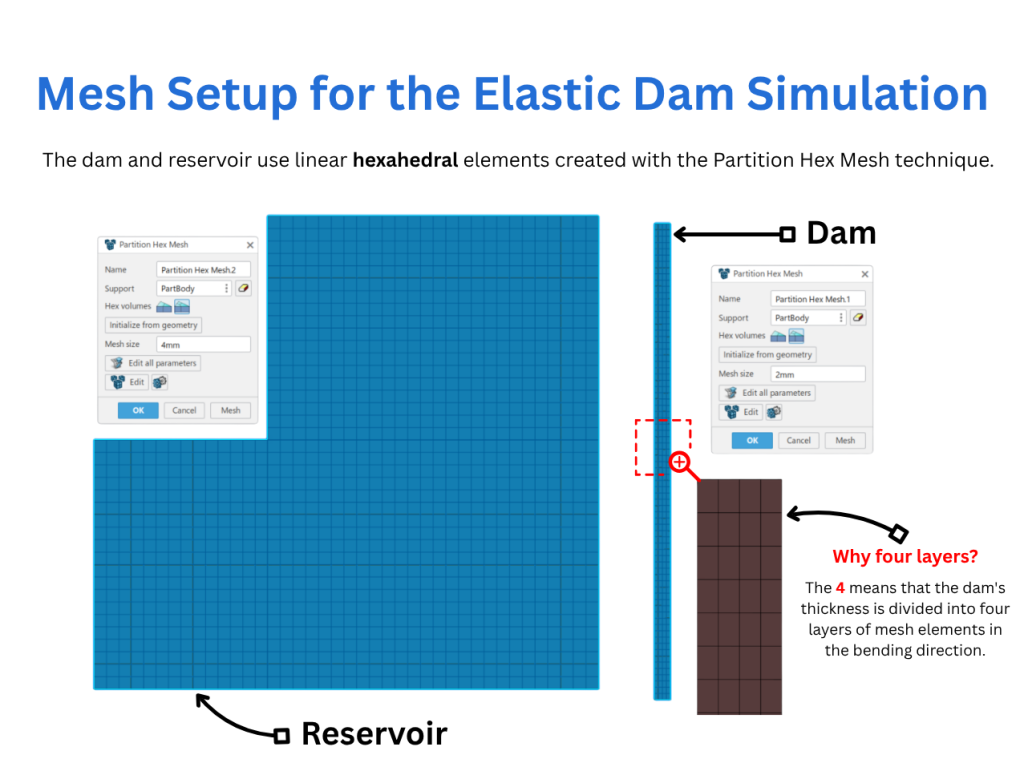
Figure 5. Mesh Setup for the Elastic Dam Simulation
The dam and reservoir are meshed with linear hexahedral elements using the Partition Hex Mesh technique.
For the dam, four elements are used through the thickness in the bending direction to capture its deformation.
The initial water geometry is not meshed as a conventional solid. Instead, it is used to define the initial location of the water within the Eulerian domain.
This setup allows the dam to deform while the water moves through the fixed Eulerian mesh.
Before setting up the simulation, we need to define the materials for the dam and the water.
The dam uses a linear elastic material with the following properties:
| Property | Value |
| Young’s modulus | 12 MPa |
| Poisson’s ratio | 0.4 |
| Density | 1,100 kg/m³ |
Young’s modulus defines how stiff the dam is, while Poisson’s ratio describes how it deforms in different directions. Density defines its mass per unit volume.
The water is defined using a Us-Up equation of state (EOS) model. This model describes how the water’s pressure changes with its density.
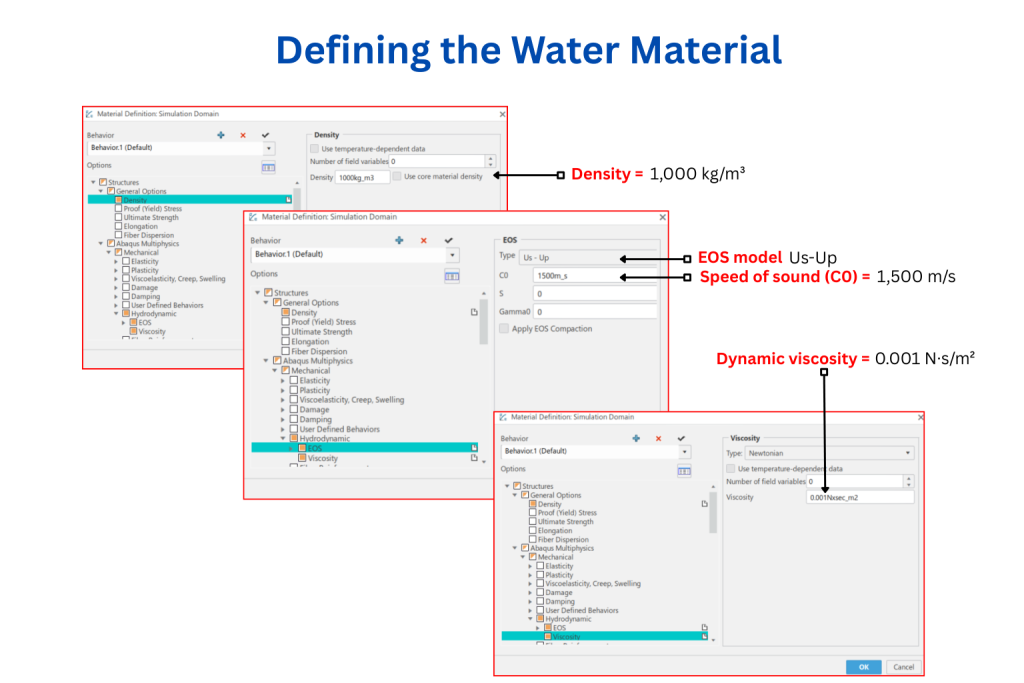 Figure 6. Defining the Water Material
Create a material named Water (Dam) with these properties:
| Property | Value |
| Density | 1,000 kg/m³ |
| Speed of sound (C0) | 1,500 m/s |
| Dynamic viscosity | 0.001 N·s/m² |
| EOS model | Us-Up |
These properties help define the water’s behavior during the simulation, including its compressibility and resistance to flow.
Once the materials are ready, we can define the Eulerian domain.
First, select the reservoir part as the support for the Eulerian property. This defines the region through which the water can move.
Next, assign the Water (Dam) material to the part representing the initial water volume. This tells the simulation where the water is located at the start.
The Eulerian mesh remains fixed while the water moves through it. This is one of the main advantages of using CEL for this example.
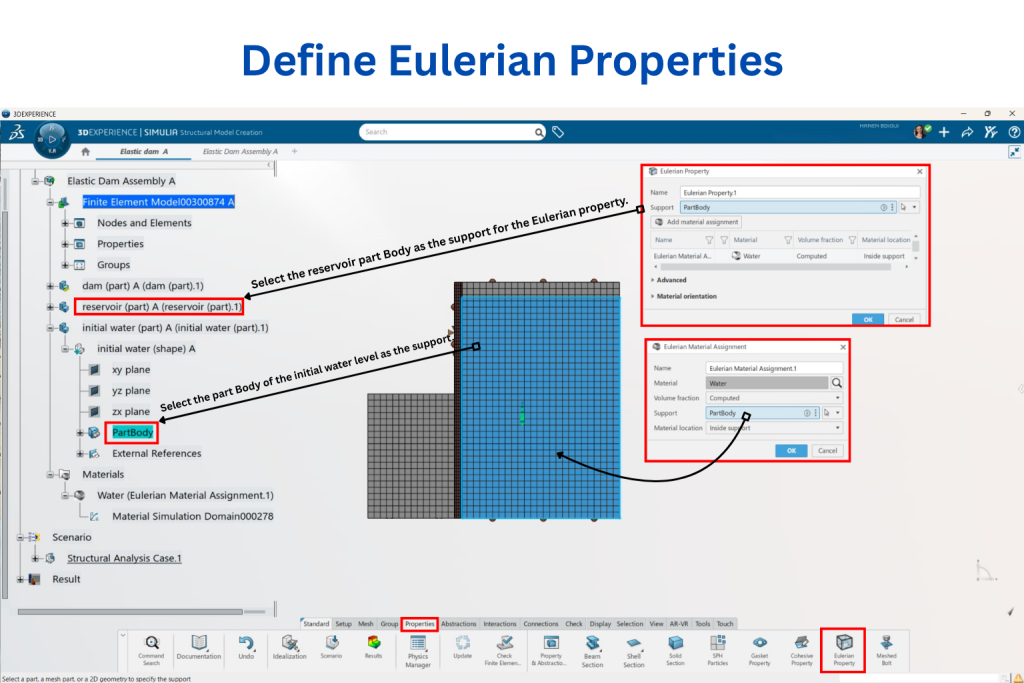 Figure 7. Defining Eulerian Preoerties
Now, create a structural simulation named Elastic Dam Simulation with CEL using the existing finite element model.
Select an Explicit Dynamics procedure and set the total simulation time to 0.2 seconds.
This procedure is suitable for the large deformation and contact interactions involved in this example.
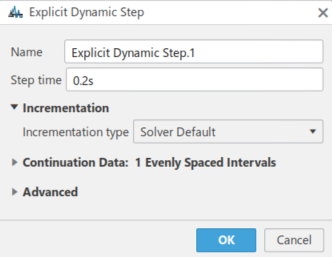 Figure 8. Explcit Dynamic Step
Create a general, frictionless contact interaction between the Eulerian water domain and the Lagrangian dam.
This allows the water to interact with the dam as it bends and the opening develops.
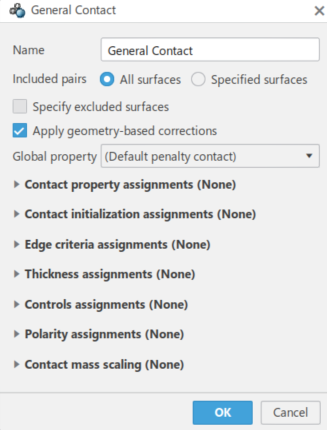 Figure 9. Defining General Contact
The model represents a thin slice of the dam to reduce the size of the simulation while keeping the main behavior of the problem.
Apply Applied Translational Velocity boundary conditions to prevent unwanted out-of-plane movement of the dam and water.
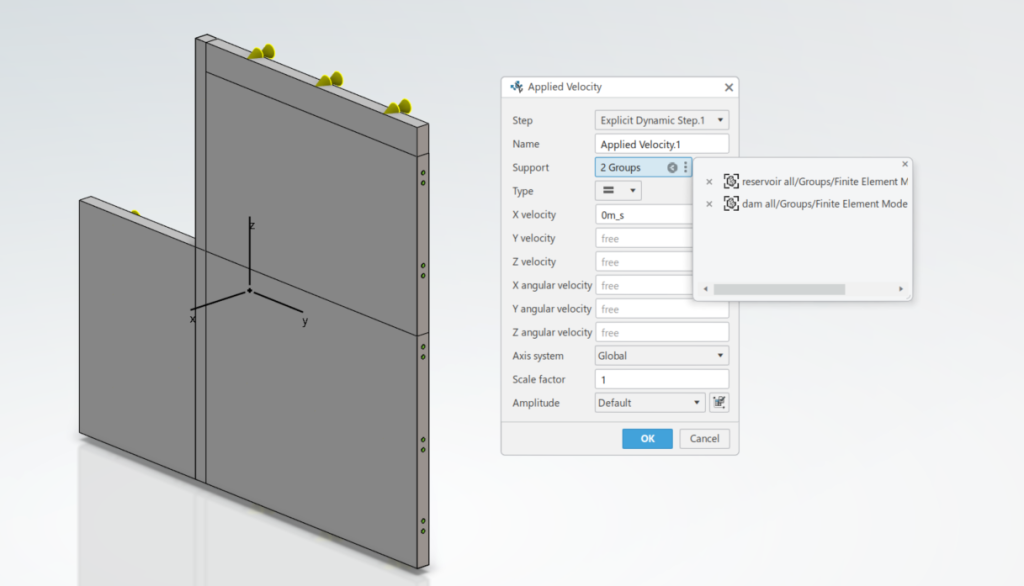 Figure 10. Applied Translational Velocity
The water must stay inside the intended simulation region, except for the opening where it can flow out.
Apply Eulerian boundary conditions to prevent water from escaping through the bottom and right boundaries of the reservoir.
You can use the predefined groups Reservoir Bottom and Reservoir Right to apply these conditions.
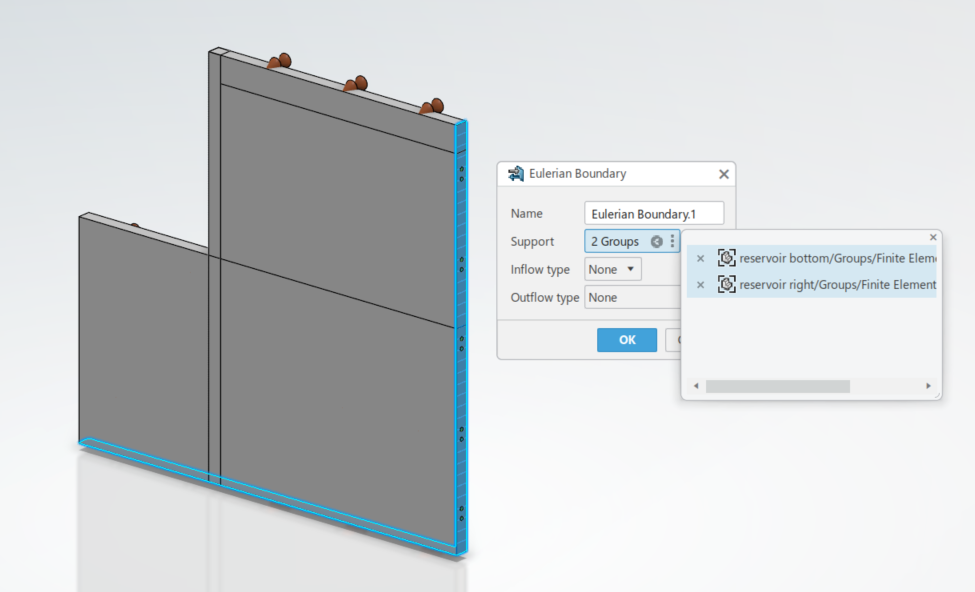 Figure 11. Defining Eulerian boundary conditions
The dam is fixed at one end and free at the other. Apply the appropriate restraint to the predefined Dam Fix group.
This allows the free end of the dam to bend under the water pressure.
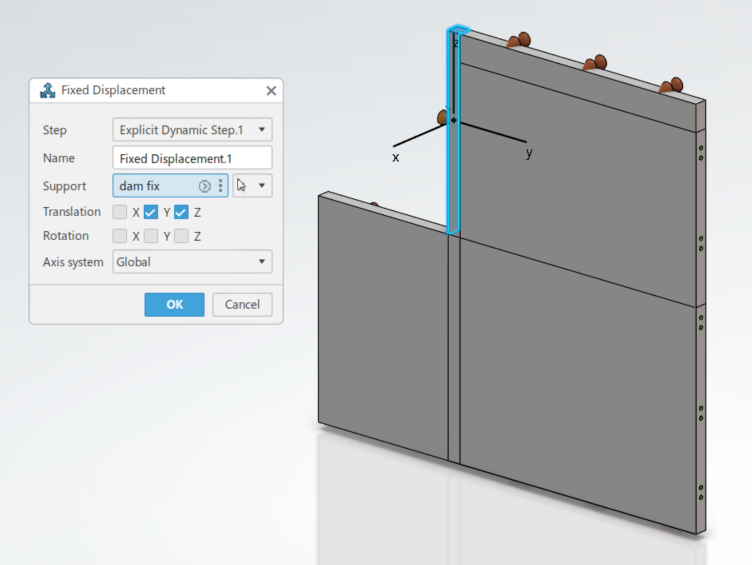 Figure 12. Fixing the Dam
Apply gravity to the entire model using the default settings to drive water flow through the opening.
For this exercise, ignore the initial stresses caused by gravity in the water.
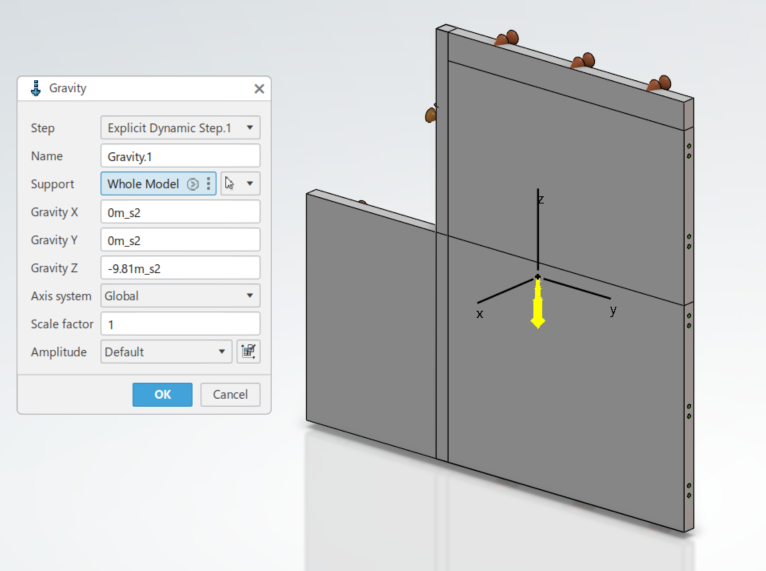 Figure 13. Applyig Gravity
Before running the simulation, we need to define which results to save.
Request the following field output variables:
Set the output frequency to 20 evenly spaced time intervals.
These results will help us follow the movement of water as the dam bends and the opening develops.
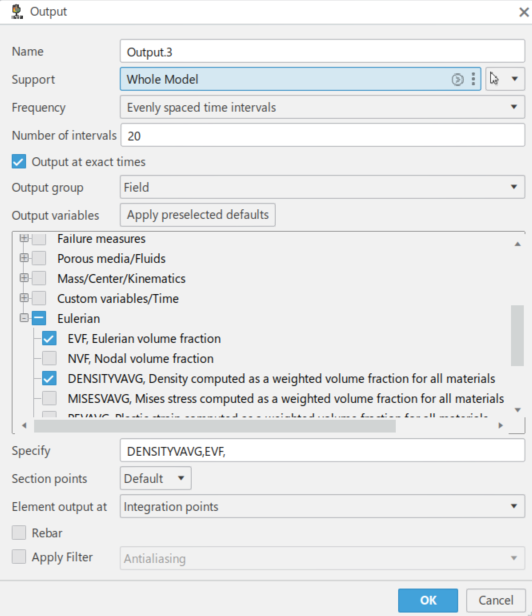 Figure 14. Output_Eulerian Volume fraction EVF+DENSITY/AVG
For the predefined Dam Tip group, request displacement history output for the U2 and U3 components every 0.01 seconds.
These results will show how the free end of the dam moves throughout the simulation.
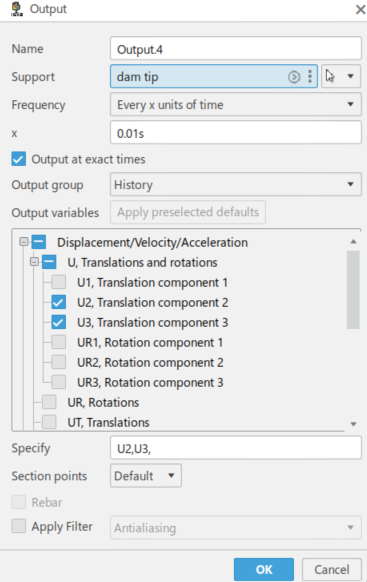 Figure 15. Output_Displacement_U2_U3
If element assignment is required, use the following types:
| Domain | Element type |
| Eulerian domain | EC3D8R |
| Solid structural domain | C3D8R |
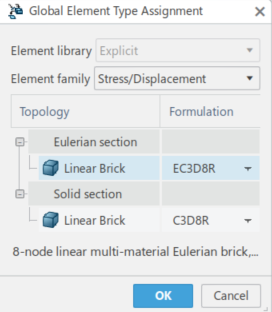 Figure 16. Global Element Type Assignment
Once you have configured everything, run the simulation and save your results.
You can now examine how the water flows and how the dam responds to the water pressure.
Create a contour plot of the Eulerian volume fraction (EVF) and display only the elements assigned to the Water material. Use blue to show the water-filled regions.
Review the results at different time points to see how the water moves through the reservoir and passes through the opening.
This makes it easier to understand how the water distribution changes as the dam deforms.
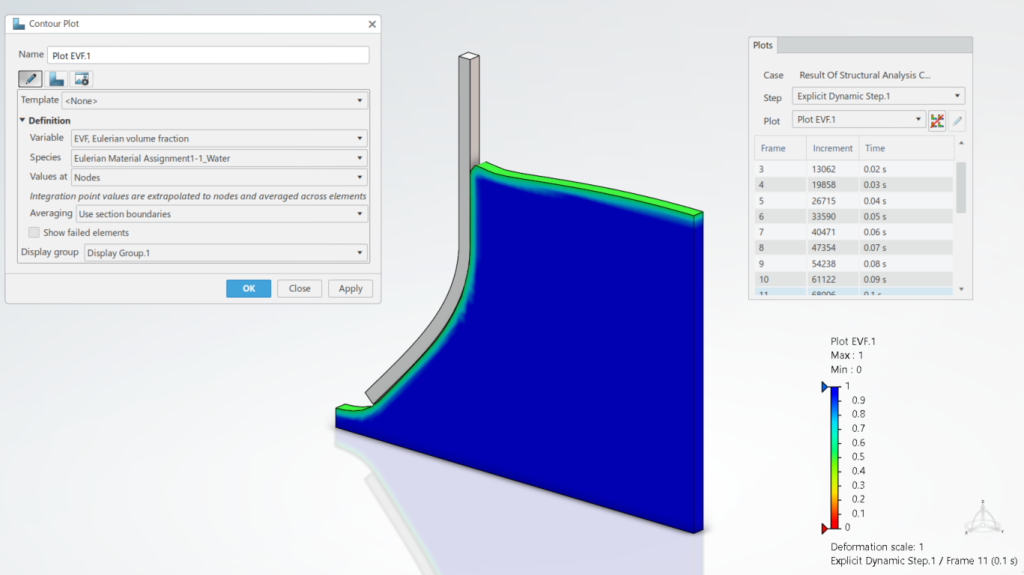 Figure 17. Result_Create Contour Plot EVF
Next, plot the displacement histories of the dam tip for the U2 and U3 components against time.
These curves show how the dam moves during the simulation and how its deformation develops.
By comparing the displacement curves with the water volume fraction plots, we can better understand the relationship between the water flow and the dam’s movement.
Together, these results help us evaluate the fluid and structural behavior throughout the simulation.
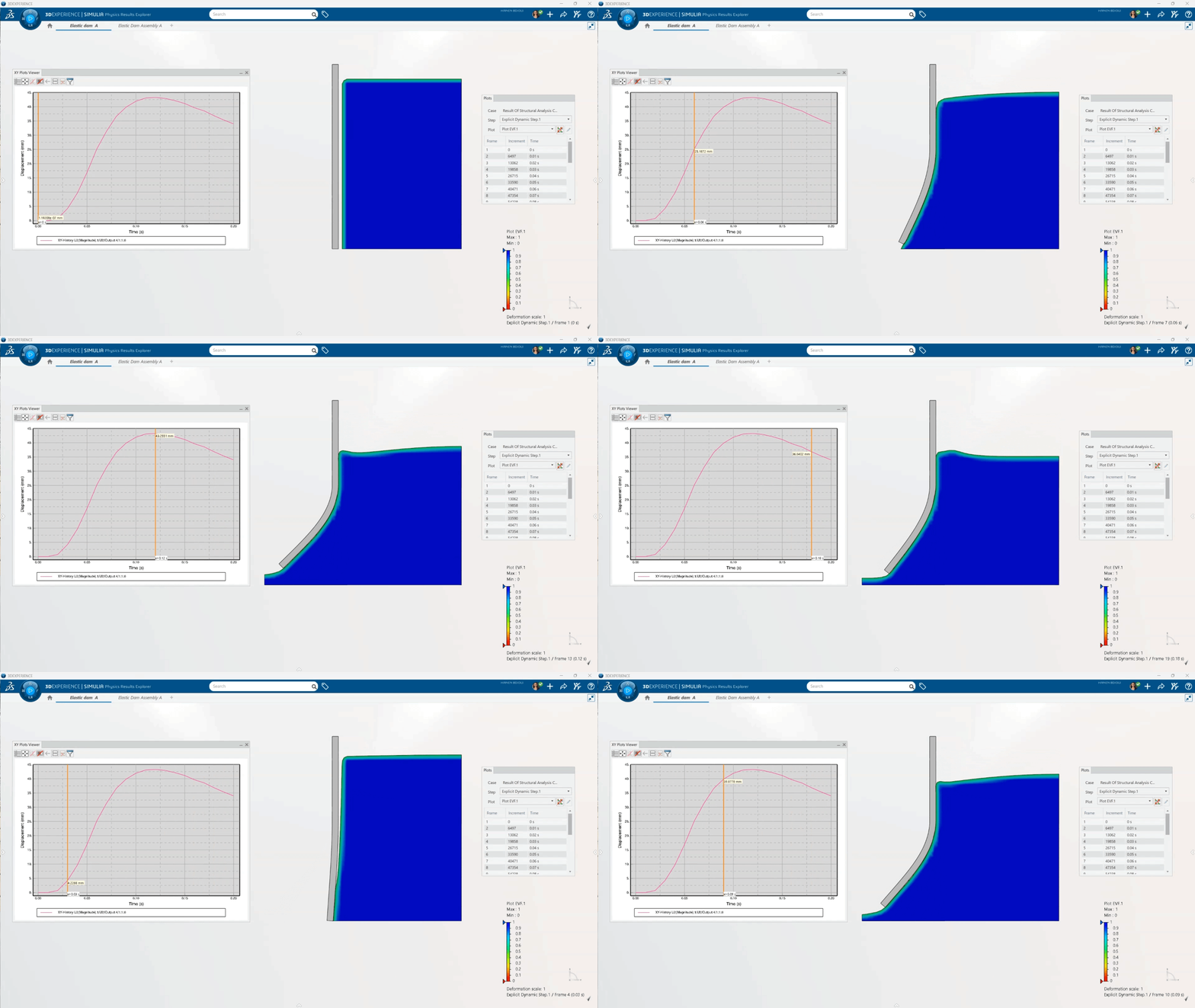 Figure 18. Result_XY_Plots
CEL analysis provides a useful way to simulate problems where fluids and solid structures interact and undergo significant movement.
In this Blog, we explored the differences between Lagrangian, Eulerian, and ALE methods before applying CEL to an elastic dam in SIMULIA 3DEXPERIENCE.
We then defined the material properties, configured the Eulerian domain, established contact between the water and the dam, and set up the analysis and output requests.
Finally, we reviewed the water flow using Eulerian volume fraction plots and examined the dam’s movement through displacement histories.

